TABLE OF CONTENTS
Overview
On CentOS/RHEL 7 systems, the Rsyslog daemon is the primary logging service, followed by the Systemd Journal Daemon (journald).
Rsyslog uses a client/server architecture and can operate in both roles simultaneously. It can:
- Run as a server to collect logs from other devices
- Run as a client to send internal system logs to a remote Syslog server
When configured as a client, logs may be:
- Stored locally
- Sent remotely
- Both stored locally and forwarded to a remote Syslog server
Prerequisites
- ADR CCE must be installed.
- Allow Syslog UDP port 514 through the firewall.
Configuring CentOS to Forward Logs to EventTracker
1. Verify Rsyslog Service Status
Check if Rsyslog is running:
# systemctl status rsyslog.service
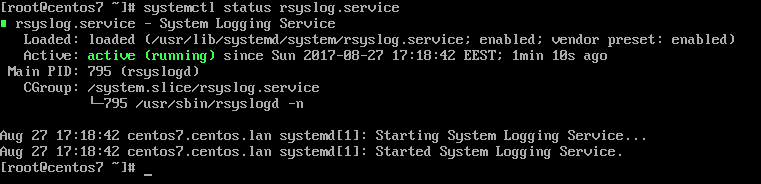
If it is not running, start the service:
# systemctl start rsyslog.service
If Rsyslog is not installed, install it:
# yum install rsyslog
2. Edit Rsyslog Configuration
Open the main configuration file:
# vi /etc/rsyslog.conf
In the Rsyslog main configuration file, search and uncomment the following lines (remove the hashtag # sign at the line beginning) in order to provide UDP transport reception to the Rsyslog server via the 514 port. UDP is the standard protocol used for log transmission by Rsyslog.
$ModLoad imudp
$UDPServerRun 514
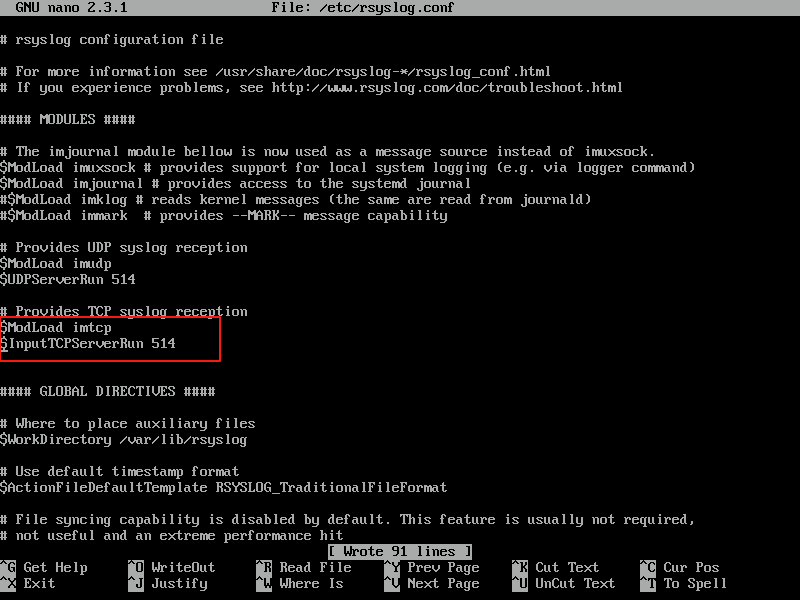 UDP is faster than TCP but does not guarantee delivery. If you require TCP, use this command:
$ModLoad imtcp
$InputTCPServerRun 514
3. Create Templates for Remote Logs
In the next step, don’t close the file yet. Create a new template that will be used for receiving remote messages. This template will instruct the local Rsyslog server where to save the received messages sent by Syslog network clients. The template must be added before the beginning of the GLOBAL DIRECTIVES block as illustrated in the below excerpt.
$template RemoteLogs,"/var/log/%HOSTNAME%/%PROGRAMNAME%.log"
. ?RemoteLogs & ~
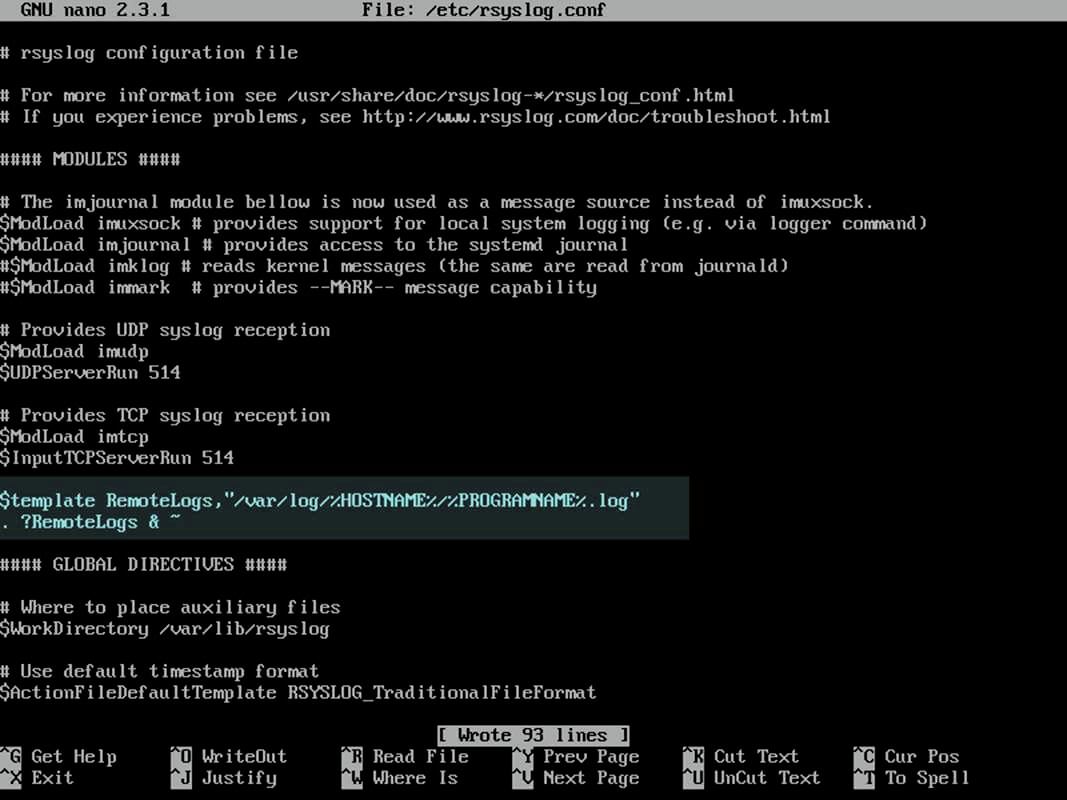 This template stores logs in directories named after the client hostname and program name. The & ~ rule stops further processing of the message.
The RemoteLogs name is an arbitrary name given to this template directive. You can use whatever name you can find best suited for your template.
In order to write all received messages from clients in a single log file named after the IP Address of the remote client, without filtering the facility that generated the message, use the below excerpt.
$template FromIp,"/var/log/%FROMHOST-IP%.log"
. ?FromIp & ~
Another example of a template where all messages with auth facility flag will be logged to a template named “TmplAuth“.
$template TmplAuth, "/var/log/%HOSTNAME%/%PROGRAMNAME%.log"
authpriv.*   ?TmplAuth
Below is an excerpt from a template definition from Rsyslog 7 server:
template(name="TmplMsg" type="string"
         string="/var/log/remote/msg/%HOSTNAME%/%PROGRAMNAME:::secpath-replace%.log"
)
The above template excerpt can also be written as:
template(name="TmplMsg" type="list") {
    constant(value="/var/log/remote/msg/")
    property(name="hostname")
    constant(value="/")
    property(name="programname" SecurePath="replace")
    constant(value=".log")
}
For more complex templates, consult the Rsyslog manual: https://www.rsyslog.com/doc/v8-stable/
# man rsyslog.conf
4. Restart Rsyslog
After you’ve edited the Rsyslog configuration file with your own settings as explained above, restart the Rsyslog daemon in order to apply changes by issuing the following command:
# service rsyslog restart
5. Verify Rsyslog Network Sockets
By now, the Rsyslog server should be configured to act as a centralized log server and record messages from Syslog clients. To verify Rsyslog network sockets, run netstat command with root privileges and use grep to filter the rsyslog string.
# netstat -tulpn | grep rsyslog
 6. Configure SELinux (If Enabled)
If you have SELinux enabled in CentOS/RHEL 7, issue the following command to configure SELinux to allow rsyslog traffic depending on network socket type.
# semanage -a -t syslogd_port_t -p udp 514
# semanage -a -t syslogd_port_t -p tcp 514
7. Configure Firewall
If the firewall is enabled and active, run the below command in order to add the necessary rules for opening rsyslog ports in Firewalld.
# firewall-cmd --permanent --add-port=514/tcp
# firewall-cmd --permanent --add-port=514/udp
# firewall-cmd --reload
Rsyslog is now configured as a centralized log server.
Note: Enabling audit logs can generate a very large volume of data and may impact performance.
Verification Steps
1. Test from Source System
Send a test message:
# logger -p daemon.warn "this is a test"
Check logs on the remote log host:
# tail /var/adm/messages
2. Verify on CCE Device
Ping the CentOS system:
# ping <IP Address of CentOS System>
Check incoming logs:
# sudo tcpdump -i any port 514 and host <IPAddress> -AAA
Was this article helpful?
That’s Great!
Thank you for your feedback
Sorry! We couldn't be helpful
Thank you for your feedback
Feedback sent
We appreciate your effort and will try to fix the article