Table of Contents
Overview
This document provides instructions to integrate Barracuda Email Security Gateway (ESG) with ADR SIEM (aiSIEM/aiXDR) using Syslog. By forwarding message log data from Barracuda ESG to ADR via the CCE (Collection and Control Engine), SOC teams gain comprehensive visibility, proactive threat detection, and advanced troubleshooting capabilities. This integration enables centralized tracking, correlation, and analysis of Barracuda logs within ADR SIEM.
Prerequisites
- A running ADR CCE (Collection and Control Engine).
- Syslog UDP port 514 must be allowed in the firewall between Barracuda ESG and ADR CCE.
Configuring Barracuda to Forward Logs to CCE
Access Syslog Settings
- Log in to the Barracuda ESG Web UI.
- Navigate to: Advanced → Advanced Networking.
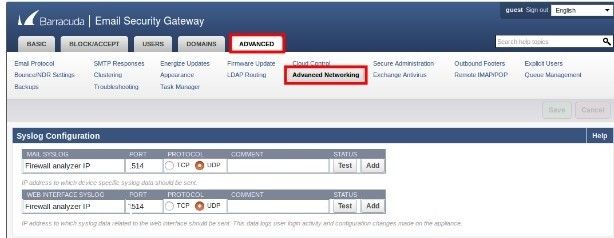
Configure Syslog Forwarding
In the Syslog Configuration section:
- Mail Syslog: Enter the CCE IP address.
- Web Interface Syslog: Enter the CCE IP address.
- Set the port to 514 and the protocol to UDP.
Click Save to apply changes.
Allow Firewall Communication
- Open any required firewall ports for communication between the Barracuda ESG and ADR CCE server.
- Refer to Barracuda Email Security Service IP Ranges for the correct source IPs if filtering.
Test Syslog Connectivity
- Click 'Test' to verify that Barracuda ESG can connect to ADR CCE.
- If successful, the logs will be transferred immediately. If the test fails, check the IP address/hostname and port, correct as needed, and re-test.
- To remove a Syslog server, click Delete.
Verification (MSSP Only)
On ADR CCE (CLI)
- Open an SSH session (using tools like PuTTY) to the CCE server.
-
Run the following command to verify log flow:
sudo tcpdump -i any port 514 and host <Barracuda_ESG_IP> -AAAReplace
<Barracuda_ESG_IP>with the Barracuda device's IP address.
On ADR UI
- Log in to the ADR SIEM UI.
-
Navigate to
System Logs and Flows > Collection Status. - Confirm Barracuda ESG appears listed under Source Device IP, indicating successful integration.
Was this article helpful?
That’s Great!
Thank you for your feedback
Sorry! We couldn't be helpful
Thank you for your feedback
Feedback sent
We appreciate your effort and will try to fix the article