TABLE OF CONTENTS
Overview
Here are the steps to integrate your Darktrace with ADR SIEM so you can have comprehensive visibility and proactive threat detection in your environment. There will be a log transfer between your firewall to APE (Analytics and Policy Engine) via CCE (Collection and Control Engine). In this document, we are guiding you through the steps for log forwarding.
Steps of configuration
- Log in to the Darktrace interface.
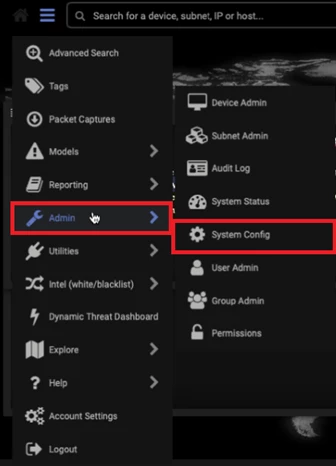
- Expand the top-left menu and select Admin; a second menu appears.
- Select the System Config page.
- In the Alerting section, click on Verify Alert Settings.
- In JSON Syslog Alerts, set the field to True.
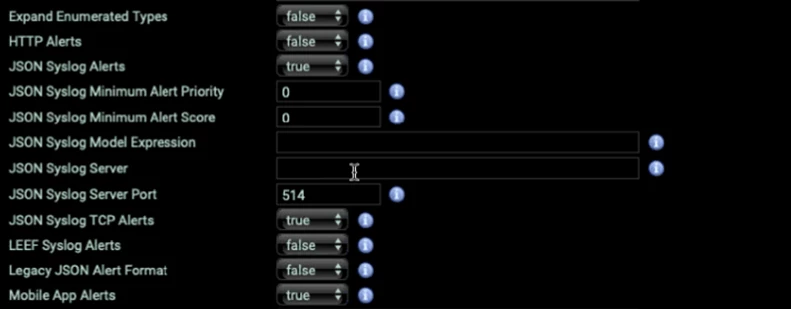
- Set Syslog server to the CCE server’s IP address.
- Set port 514 UDP to use with the CQ event source.
- Set JSON Syslog TCP Alerts to True.
Reference link: Darktrace | InsightIDR Documentation
Verification
Verification can be done either from the CCE server or from the ADR UI.
Using the UI
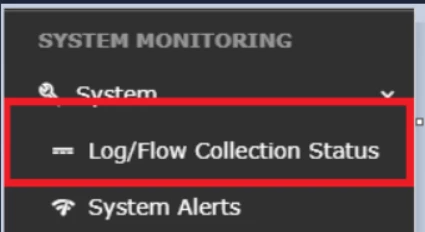
- Log in to the UI with administrative rights and navigate to System >> Log/Flow Collection Status.
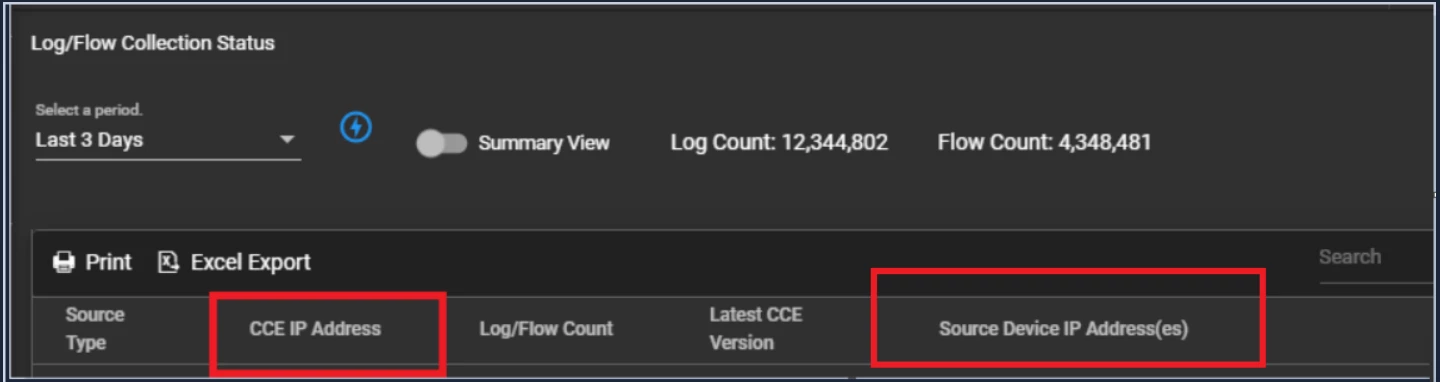
- Inside Source Device IP, the IP address of the device will be shown, including the number of logs sent to the ADR servers.
Using CCE server
Run the following command on the CCE server to check whether logs are being received:
sudo tcpdump -i any host 514 and host <IP address> -AAAWas this article helpful?
That’s Great!
Thank you for your feedback
Sorry! We couldn't be helpful
Thank you for your feedback
Feedback sent
We appreciate your effort and will try to fix the article